Build Invoices From Real Project Data
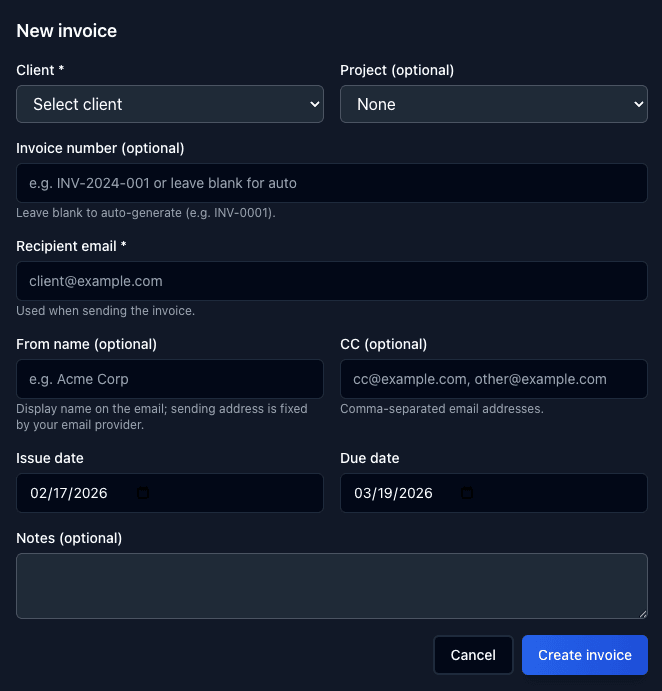
Stop copying hours from timesheets into a separate invoicing tool. Tail AI pulls directly from your tracked tasks and projects to create accurate invoices. Add custom notes with payment instructions, terms, or anything your client needs to know — then send it off.
- Auto-populate line items from tracked time and tasks
- Add custom notes, payment terms, and instructions
- Attach to specific projects and clients
- Professional invoice layout ready to send
See Every Invoice Across Your Account
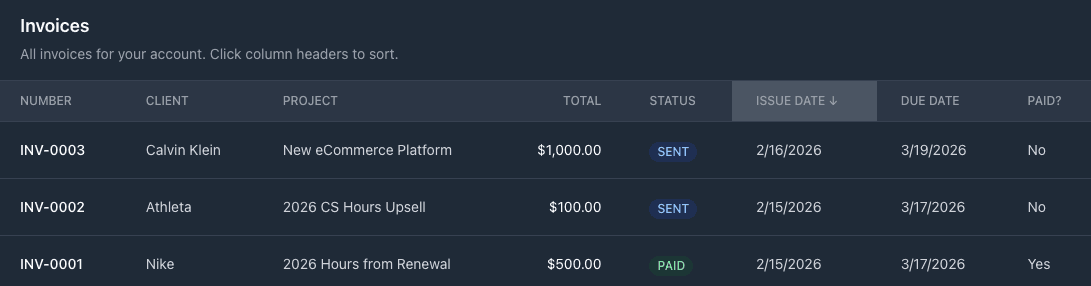
The invoice report gives you a single view of every invoice created in your account — the amount, the client, and whether it has been paid or not. No more digging through email threads or spreadsheets to figure out who owes you money.
- All invoices in one centralized report
- See amounts, dates, and payment status at a glance
- Filter by client, project, or payment status
- Quickly identify overdue and outstanding invoices
Mark Invoices Paid and Make Edits on the Fly
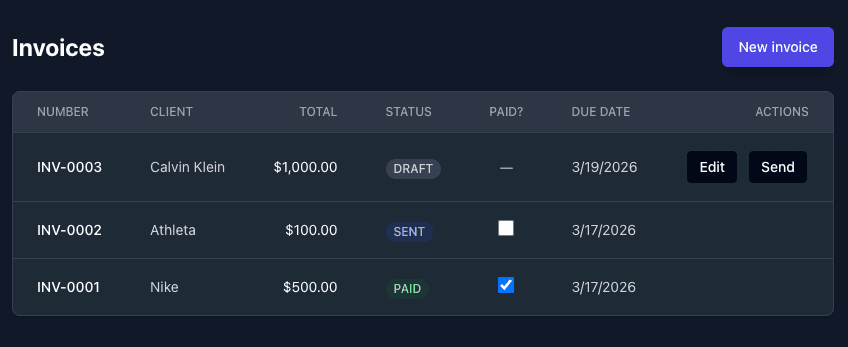
When a client pays, mark the invoice as paid with one click. Need to adjust a line item or update a note? Edit any invoice directly from the chart view. Everything stays up to date so your books are always accurate.
- One-click mark as paid or partially paid
- Edit invoice details, notes, and line items anytime
- Visual chart of invoice statuses and trends
- Full history of changes for audit trails
Invoicing Built Into Your Workflow
No separate invoicing tool needed. Create, send, track, and get paid — all from the same place you manage your projects.
One-Click Invoice Creation
Generate invoices directly from tracked time and project data. No re-entering hours or line items.
Custom Notes & Terms
Add payment instructions, terms, notes, and any custom details your clients need to pay you.
Send & Share Invoices
Email invoices directly to clients or share a link. Clients see a clean, professional invoice.
Payment Tracking
Mark invoices as paid, partially paid, or overdue. Always know where your money stands.
Invoice Reports
See all invoices across your account with amounts, statuses, and aging at a glance.
AI Invoice Insights
Get alerts on overdue invoices, spot payment trends, and identify clients who pay late.